The Secret Behind Fast DB Queries?
A Practical Guide to Indexes, Disk I/O, and Why B‑Trees Still Rule

Ok, you woke up in the morning as an unemployed web dev who recently created a million-dollar social media app where you can talk with your shawty day and night. On a single day, you have around 1 million users starting to use your app because you have a highly genius marketing strategy like Snapchat. But this fame was temporary; your users started leaving your web app and again shifted to different platforms, you were trying to figure out what was going wrong, and you asked one of your users, and he said that your app is lagging whenever he tries to see her girlfriend’s account.
You are pretty shocked and saw your models of user and figured out that for every DB call, you are searching a million user database every time in a binary search method, which is like an O(logN) operation, which causes your dashboard to wait 200 milliseconds before showing the particular user. That’s two‑tenths of a second — an eternity in the world of responsive software. You profile your code and, to your surprise, the culprit isn’t CPU‑heavy sorting or complex business logic — it’s the simple act of searching a sorted file on disk.
Overall Calculations
At first glance, binary search promises O(log₂N) comparisons.
For N = 1⁰⁶, that means, log₂ 1⁰⁶ ≈ 20
This looks good, but the real bottleneck: disk access time. Binary search over unsorted or unindexed files stored on disk often involves multiple random disk reads, each with high latency due to:
- Seek time (moving the disk head): ~8 ms
- Rotational latency (waiting for the right sector): ~4 ms
- Transfer time (actually reading): ~<1 ms
Thus, each random disk I/O costs ~10 ms.
Let’s break down the cost of naive binary search on a million-record file:
Setup Breakdown
- File Size: One million records (¹⁰⁶ records).
- Block Size: 16 KB (16 * 1024 bytes).
- Record Size: 160 bytes.
- Records per Block: 16×1024 bytes/160 bytes/record = 102.4 ≈ 100 records per block (since a record cannot be split across blocks).
- Disk Access Time: Approximately 10 ms per disk block read (random I/O).
When performing a search using binary search, you often encounter random I/O operations. This process involves finding the middle element and comparing it according to the IDs from both the left and right sides. However, you may need to read from different disks multiple times, which can average around 14 reads. This results in approximately 140 ms of wasted time, as that is calculated by 10 ms multiplied by 14.
Ultimately, you are left with the last 6 entries, which are likely where you’ll find your result, as these will typically be in memory. If you factor in a few additional read operations for the final block scan, you will find yourself firmly in the 150–200 ms range.
Enter the B-tree
As our biggest load was that our disk I/Os are very expensive, so in this idea we are going to slash disk I/O by reading thousands of keys in one go. Instead of a binary tree(branching factor = 2), we use a multiway search tree — a B-tree or B+-tree — whose nodes hold as many keys as will fit in one disk block.
- Block size: 16 KB
- Entry size(Key+pointer): 16 B
- Fan-out
fan‑out ≈ 16KB / 16 B=1024
- Tree height for N = 1⁰⁶:
log₁₀₂₄ 1⁰⁶= 2
In this approach, we see that we go from ~20 levels (binary) down to 2–3 levels(B-tree). Each level is one disk read, so we only need to check for 2–3 reads instead of 14, which is a big breakthrough in the world of optimizations.
Node Layout Sketch
Every B-tree node stored on disk typically looks like:
[ header | key0 | ptr0 | key1 | ptr1 | … | keyM | ptrM | padding ]
- Header: node type, number of keys
- Array of keys: sorted
- Array of child pointers: addresses of child nodes or record blocks
When you try to search for a particular user, you do the following thing sequentially:
- Read the root block, which is likely being loaded into the RAM.
- Do a binary search on the in-memory array of up to 1023 keys — ~10 in-RAM comparisons.
- Follow the pointer to the next child block on the disks
- Repeat until you reach a leaf.
And Voila! You found his girlfriend’s user easily with less than negligible time in the database query.
A Practical Benchmarking
To illustrate the impact of a database index, I performed a benchmark using SQLite. I created two tables, people_idx and people_nidxEach contains a million rows of fake user data. The people_idxtable had a primary key index on the id column, while people_nidx did not. By performing 100 random lookups on each table and measuring the time, we found that lookups in the indexed table were dramatically faster.
This is the overall Python code that I ran on Google Colab
import sqlite3
import time
import random
import matplotlib.pyplot as plt
from faker import Faker

# Setup
DB_PATH = 'million_users.db'
N = 10**6
LOOKUP_COUNT = 100
faker = Faker()

# Connect
conn = sqlite3.connect(DB_PATH)
cur = conn.cursor()

# Optimize for speed
cur.executescript("""
PRAGMA synchronous = OFF;
PRAGMA journal_mode = MEMORY;
DROP TABLE IF EXISTS people_nidx;
DROP TABLE IF EXISTS people_idx;
CREATE TABLE people_nidx (
    id INTEGER,
    name TEXT,
    email TEXT,
    age INTEGER
);
CREATE TABLE people_idx (
    id INTEGER PRIMARY KEY,
    name TEXT,
    email TEXT,
    age INTEGER
);
""")

# Generate and insert 1 million rows
def insert_data():
    batch_size = 10000
    for start in range(0, N, batch_size):
        batch = []
        for i in range(start, start + batch_size):
            name = faker.name()
            email = faker.email()
            age = random.randint(18, 90)
            batch.append((i + 1, name, email, age))
        cur.executemany("INSERT INTO people_nidx (id, name, email, age) VALUES (?, ?, ?, ?)", batch)
    conn.commit()
print("Inserting data...")
insert_data()

# Copy to indexed table
print("Creating indexed table...")
cur.execute("INSERT INTO people_idx SELECT * FROM people_nidx")
conn.commit()

# Measure average lookup latency
def measure_latency(table):
    ids = random.sample(range(1, N + 1), LOOKUP_COUNT)
    start = time.time()
    for i in ids:
        cur.execute(f"SELECT * FROM {table} WHERE id = ?", (i,))
        cur.fetchone()
    end = time.time()
    latency = (end - start) * 1000 / LOOKUP_COUNT
    return latency

print("Benchmarking...")
lat_nidx = measure_latency("people_nidx")
lat_idx = measure_latency("people_idx")

print(f"Average lookup latency (no index): {lat_nidx:.4f} ms")
print(f"Average lookup latency (primary key index): {lat_idx:.4f} ms")

# Plot
methods = ["No Index (Full Scan)", "Primary Key Index (B-Tree)"]
latencies = [lat_nidx, lat_idx]
plt.bar(methods, latencies, color=["tomato", "mediumseagreen"])
plt.ylabel("Avg Lookup Time (ms)")
plt.title("SQLite Lookup Performance (1 Million Users)")
plt.grid(axis="y")
plt.show()
Whose overall output is this
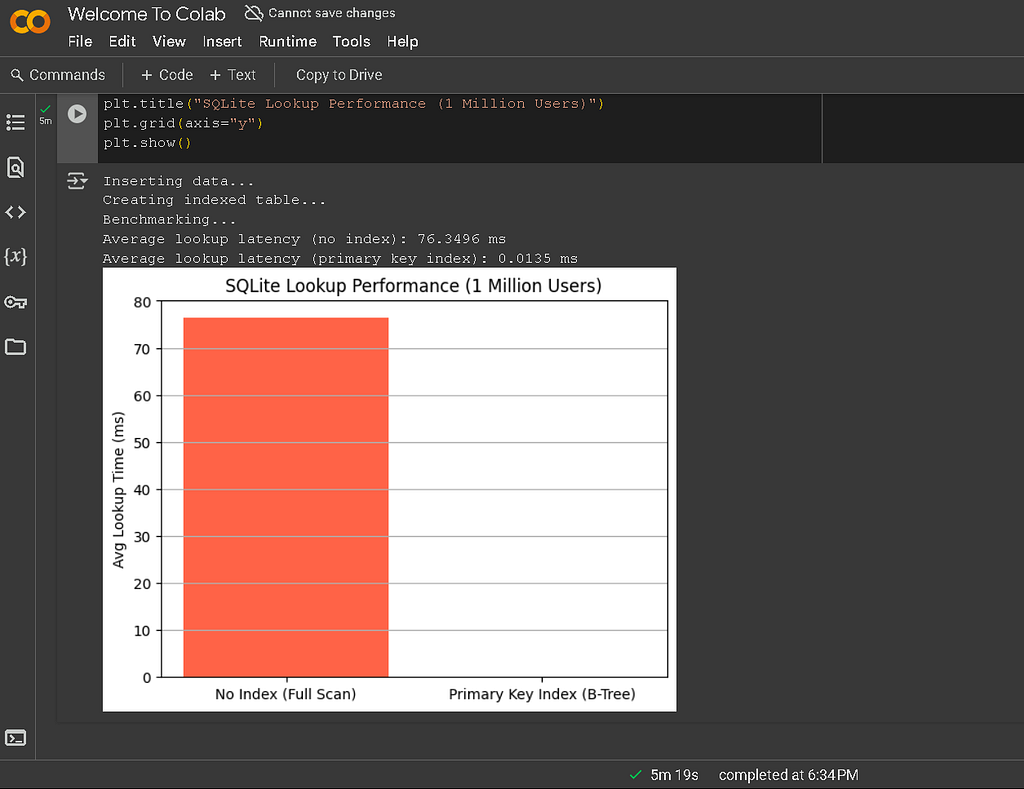
The following output shows that full scans take around 76.3496 ms while the index-based B-tree takes nearly zero time to fetch the current data. This highlights how indexes, like the B-tree index used by SQLite, allow the databases to quickly locate specific data, avoiding a full table scan.
For example, the equation log₁₀₂₄ ¹⁰⁶= 2 helps us understand how efficiently a database can narrow down its search when using an index.
Not only SQLite, but also every other DB, file systems use this same approach of B-tree, like PostgreSQL, MariaDB, etc., and file systems ext4, Btrfs — Btree is its bread and butter, and NTFS all more or less use it for sure.
Conclusion
While binary searches are important and may sound fast, theoretically, the performances are downgraded; the reality on disk-based databases is very different. Each trigger during comparison may trigger a costly random disk read, turning a few microseconds of CPU work into hundreds of milliseconds of I/O wait.
So we say that indexing in the database is the most important step, which is why most databases always try to assign this automatically. Indexing I result reduces the disk I/Os to just 2–3, thanks to high fan-out nd cache-friendly access patterns in high-performance lookups.
The Secret Behind Fast DB Queries? was originally published in Technology Hits on Medium, where people are continuing the conversation by highlighting and responding to this story.