Serverless vs VM vs App Engine: Choosing the Right Cloud Solution
Tomorrow while doing my internship assignment I have to create a microservice called a ‘Resilient mailing service’ in which I need to send a message to the receiver by taking the help of a message queue platform “Rabbit MQ” that uses a docker container sourced from “docker-hub”
So, I have options as follows:
- Virtual Machines
- Cloud Run(Serverless Computing)
- App Engine
I got overwhelmed; what should I use to stay profitable while achieving maximum output?
So, the motive for writing this article is to find a way to ensure that you are always profitable and get the maximum out of it, so sit back and let’s go.
Before using, let’s briefly know each concept with use cases.
1. What is Serverless Computing?
It’s like a lazy dude(me) who only works when there are requirements.

Similarly, Serverless computing is a method of providing backend services only on demand. The meaning of serverless doesn't mean that a server is not involved; a company always provides a server for the endpoints deployed onto the cloud, and they are charged based on usage, not on the amount of resources used up. A serverless provider allows developers to write and deploy code without depending on what is happening under the hood.
Serverless saves the bills of the developers by introducing concepts called a ‘Pay-as-you-go’ basis, meaning that the developers only have to pay for the services they use.
Like buying but paying only when used
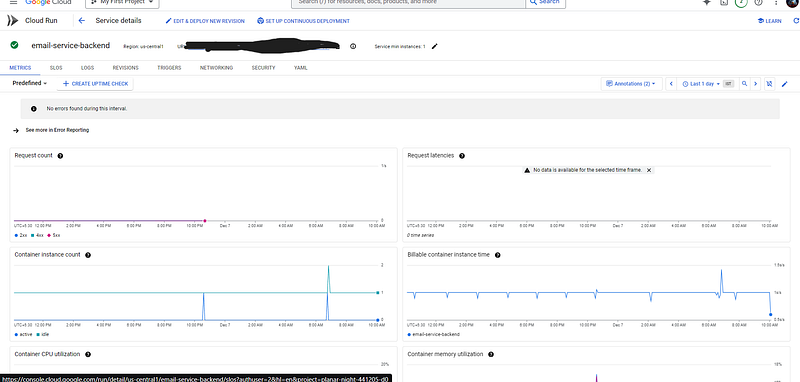
You can also run the docker images depending on your requirement from the artifact registry like I am running the same here.
Benefits
- Cost-Effectiveness: Pay only for the executions of time of the APIs deployed.
- Scalability: On demand they can able to scale.
- Reduced Management: There is no requirement to provision the servers manually.
Ideal Use Cases:
- Event-driven applications (e.g., triggers from APIs or file uploads).
- Backend for mobile apps.
- Microservices architecture.
2. What is a Virtual Machine (VM)?
Virtual machines are the digitalized form of physical computers.
They do the task virtually which can be done in physical computing environments they can able to run programs, run operating systems, connect to the network, and also able to do a task that requires computing overhead depending on the system. It is Infrastructure-as-a-Service means you need to manage everything from scratch and configure it according to your own requirements.

Generally to create a VM in the cloud you need to configure it for your own requirements which can maximize the performance while maintaining the close because using cloud VMs is the best way to burn your money. Because they are done with a pay-for-resources pricing model.

As long as you keep things controlled you are good to go, but I burned around $50 on this because of an unused VM open.
Benefits
- Cost-Efficiency: This may be a debatable topic but as you see you don't need to pay for the electricity bill, and also not for the maintenance of the systems only for the resources you use.
- Scalability: The must required for startups who need more and more systems when required, you can able to scale the virtual machines as per your requirement needs without considering the maintenance costs. Some vendors like GCP, and AWS allow us to auto-scaling features also.
- High Availability and Reliability: Most of these vendors are always backed by redundant systems.Various options to deploy across multiple regions and zones for failover and disaster recovery, which in this case are reliable because the service deployed by us has always been available when we require it.
- Flexibility: We have the flexibility to run any operating system on a requirement basis. We have the option to choose from a wider range of types of VMs like general-purpose, compute-optimized, memory-optimized, etc.
Common Use Cases
Most of them are used in as follows:
- Web Hosting: used to run websites and applications.
- DevOps: Helpful in building the CI/CD pipelines in isolated environments.
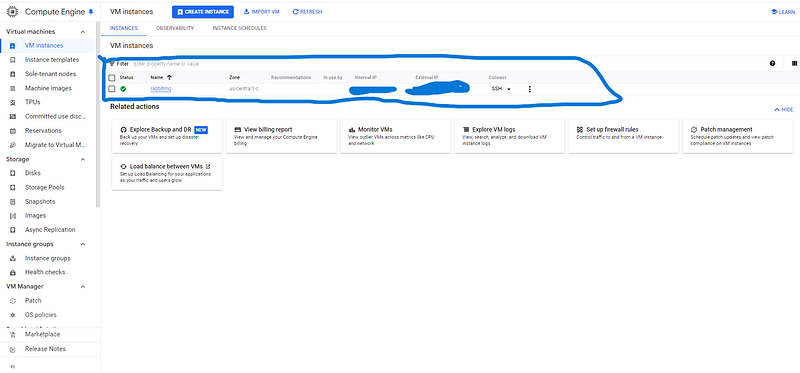
- Running Docker Images: They are used to run virtual machines like here I am running the docker image naming rabbitMQ which is also a message queueing service.
- Big Data: Process and analyze large datasets.
- AI/ML: Train and deploy machine learning models.
- Backup and Storage: Cost-effective disaster recovery.
What is Google App Engine?
This is similar to a virtual machine but the best part of this is based on the Platform as a Service (PaaS) architecture which means you just deploy your code on the platform and the architecture will take the workload on how to do the scaling thing, memory allocations, etc. Let's say your app becomes famous in the future then the App engine creates more instances as per the requirement load.
This is the best way to get started because ever everybody doesn't knows most of the customizations and trade-offs to do in the cloud.
Comparisons to the app engine with the compute engine are that the compute engine comes to 0 instances running in case of 15 min no activity while the compute engine keeps on running.
Benefits
Managed Services: They can scale up and down based on the requirements.
Built-In features: They have all the built-in features like logging, monitoring, and traffic spilling.
Integrations: App engines can work seamlessly with the other cloud services.
Ideal Use Cases:
- Monolithic web applications.
- Rapidly prototyping and deploying apps.
- Scalable, always-on applications.
Key Comparisons
How to Choose the Right Solution
The conclusion for everything you read till here is as follows:
- Choose Serverless if:
- Let's say you want to minimize costs and management effort then you must go for serverless because they only charge for the pay-per-use means you don't need to pay fully for the system you using.
- Your application is event-driven and is also a microservice like a ‘resilient email-sending-service’.
2. Choose Virtual Machines if:
- You need full control over the environment like the kernel-level power customization in the virtual machines. This is the same as the custom-built Dodge Challenger fully manual 1200 HP.
- You’re working with legacy systems or complex workloads.
3. Choose Google App Engine if:
- You want a balance between managed services and flexibility. Mostly used when we need to deploy a monolithic codebase.
- You’re building scalable, user-facing applications. They have the power to scale up and down on their requirements.
Conclusion
Concluding the things up the use of any of these three cloud services solely depends on the developers and their expertise in the cloud service. If you are targeting the agile deployment with only important control over the environment then you must go for the serverless, while you want full control over the system and the environment of the deployment then Virtual machines are the way to go. If you don't want to know the underlying architecture of scaling with only minimal configurations and you just care about your codebase then your only choice is the App engine.