How I Built a Lightning-Fast Text Encoder for Edge Devices
Real-time inference, no cloud required

Recently, I was creating my wallpaper app in Flutter for Android native, for which I needed a search feature, so I did research on how Mobile wallpapers have implemented search features; most of them work well; basically, they use tag-based searching on the images. Still, the biggest gap between this and the real search feature is that some times and majorly many a times this search feature wont works because tags are not efficient so we skipped to a new feature(may be overengineering working best for me) called as vector image embedding searching, most of u know this and used in life if you are already a developer but the biggest question how to do this on mobile app and most important is how to do it in milliseconds so that a search features wont kill the whole app’s impression. So stay behind and take your coffee, and let's get started.

This article will help i get to a solution, maybe it is over-engineering, but take it only as a tutorial.
Advantages of this Approach
Ok, before even reading, what are the benefits of doing this? I know only 3, and most importantly is sufficient for using this.
- Accuracy
- No cost to host any model
- Fast inference, even in milliseconds, for everyone.
My Approach
First, to run a text encoder, we need a model that accepts a query and converts it into embeddings of a particular dimension. In our case, it is 768 dimensions, as we are using ViT-L-14. Initially, in my mind, I have these two 2 questions.
- How to feed IDs tos To the model, as we need a tokenizer for it.
- If we run this model, then somehow, after getting the input_ids from the query, how to convert them to an embedding? Running this model on a phone may crash it, as its text-only encoder model is around 600 MB or in some GBs.
So the solution is as follows.
- FRB(Flutter Rust Bridge) → For the tokenizer part
- ORT(ONNX Runtime) → For the model to run efficiently
I know it jumps above the head, so let's go slow. What are they, and how are they aiming to run our search feature smoothly?
Bridging
FRB, which stands for Flutter Rust Binding, is A binding generator which helps to write Rust code runnables in Flutter so The biggest question is why we are even using rust for simple search features, as we know that Huggingface’s tokenizers is written mostly in Rust, for which I got a hint that there must be a package which loads tokenizers and creates input_ids for sure which eventually lead to the final destination Tokenizers crates.io.
Installation
FRB Automates the creation of FFI (Foreign Function Interface) bindings, simplifying the process of calling Rust functions from Dart and vice versa
cargo install flutter_rust_bridge_codegenAs it is in Rust, which is natively bridged using FRB, this code is responsible for loading the tokenizers and encoding the text query.
use anyhow::Result;
use std::sync::{OnceLock, Mutex};
use std::path::Path;

use ort::session::{Session, builder::GraphOptimizationLevel};
use ort::value::Value;
use tokenizers::Tokenizer;

static TOKENIZER: OnceLock<Tokenizer> = OnceLock::new();
static ORT_SESSION: OnceLock<Mutex<Session>> = OnceLock::new();

pub fn init_models(model_path: String, tokenizer_path: String) -> Result<()> {
    let tokenizer = Tokenizer::from_file(Path::new(&tokenizer_path))
        .map_err(|e| anyhow::anyhow!("Failed to load tokenizer: {}", e))?;

    ort::init()
        .with_name("VIT-4")
        .commit()?;

    let session = Session::builder()?
        .with_optimization_level(GraphOptimizationLevel::Level3)?
        .with_intra_threads(1)?
        .commit_from_file(&model_path)?;

    let _ = TOKENIZER.set(tokenizer);
    let _ = ORT_SESSION.set(Mutex::new(session));
    Ok(())
}

pub fn encode_text(text: String) -> Result<Vec<f32>> {
    let tokenizer = TOKENIZER.get().expect("Tokenizer not initialized!");
    let mut session = ORT_SESSION.get()
        .expect("Model not initialized!")
        .lock()
        .map_err(|_| anyhow::anyhow!("Failed to lock session"))?;

    let encoding = tokenizer.encode(text, true).map_err(|e| anyhow::anyhow!(e))?;
    let mut ids: Vec<i64> = encoding.get_ids().iter().map(|&x| x as i64).collect();

    if ids.len() > 77 { ids.truncate(77); }
    else { while ids.len() < 77 { ids.push(0); } }

    let input_value = Value::from_array((vec![1, 77], ids))?;

    let outputs = session.run(ort::inputs![input_value])?;

    let (_shape, data_slice) = outputs[0].try_extract_tensor::<f32>()?;
    let mut vector: Vec<f32> = data_slice.to_vec();

    let norm: f32 = vector.iter().map(|x| x * x).sum::<f32>().sqrt();
    for x in &mut vector { *x /= norm; }

    Ok(vector)
}
Code explanation
The code above has 2 functions, one named init_models and another named encode_text, which gives the solution to both the problems we discussed above, of tokenization and text encoding.
The number ‘77’ used in the above code is used for the size of the array created of size 77. If the array remains small, then 0’s are padded, and if more than 77, then 0’s are cut off. Moreover, ‘77’ is particularly used for the clip model, and using openai/clip-vit-large-patch14. They are good at zero-shot classification and such minimal search tasks.
The Mut here stands for mutex, which is used to make the onnx model thread-safe by implementing the mutual exclusion principle valid so that our single-threaded session created using the model will not fall into a deadlock, and our system will not hang.
So finally, after the text encoding outputs are created of 768 dims, which can further be used later.
Dart Code Generation
OK, this is Rust, but my app understands the Dart language, so we need to generate bindings for it using the built-in generate CLI command, similar to the Rust one.
flutter_rust_bridge_codegen generate --watchThis will generate all the necessary glue code needed to use the Rust function in Dart itself. The -watch argument is used to generate code as soon as there is a change in Rust and create the necessary glue code.
Now this can be used normally on the Dart and Flutter environment correctly.
Vector DB Search On mobile
After creating the embeddings, you could technically use any standard vector DB like Pinecone. I decided to stick with pgvector on Supabase.
It’s a bit of a workaround, but shifting the embedding generation to the edge was a huge win. We don’t need to burn server resources creating embeddings — we just let Postgres handle the search.
The only bottleneck right now is storage. My 8,000+ images are already sitting at 71MB. With Supabase’s 500MB free tier limit, I might have to move to Pinecone if I want to scale up.
On the technical side, we used ONNX Runtime (ORT) for the Android implementation. It’s optimized for mobile and supports virtually every processor architecture out of the box. The results were pretty impressive.
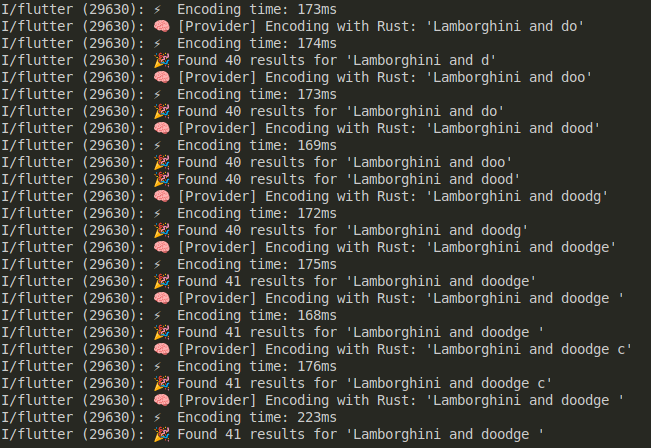
Don't focus on logs; they are AI-generated, for debugging. Almost all of them have very decent encoding time(100–300ms), as we are using the model locally.
Conclusion
So, Wrapping It up, we can run small or AI models using this small strategy.
- Use the Tokenizers Rust Library of Hugging Face to create input_ids.
- Then we can use those input-ids, which may be padded depending on the text.
- Create Flutter bindings using the FRB codegen command.
- Finally, convert them to embedding, then use them for vector search on Supabase.
This is just a starter tutorial. I haven't explained what I really faced while building this ONNX model, running ORT on mobile, and the Gradle dependencies used. Let's move it to the next tutorial.
Till then, Peace Out!