How does SSO(Single Sign-On)Work?
Enter Once, Use Every Where

Imagine a situation in which you are a landlord of around 10 rooms of an apartment and you want to show a room to a person for a stay. Still, before this you need to find the individual key of the particular room but what if there is a condition in which you need to unlock the main gate? According to it you were validated and allowed to show any room of that apartment with the reference to the main entrance. I know this may not be possible but the same thing is possible in the digital world and the technology or a concept that you are going to study is known as SSO(Single Sign-On).
What is SSO?
SSO is a technology that helps in integrating different login screens into one so that a user needs to log to the server with proper and accurate credentials and can able to use their SaaS applications with the SSO server authentications without the credentials requirements every time.
It is essential for businesses that have different role-based systems for HR, payroll managers, and different work ethics, an SSO solution allows employees to access each of those services with just one login.
Let’s consider you went to a rich friend’s wedding in which different food stalls(Domains) are there, if you want to eat from a stall you need to show them your invitation card(Credentials) proving that you are the legit person(user) to use this stall to eat from. But this is not a good system as you will become frustrated every time you change your preference from one stall to another. Instead of this system, we can place a guard at the start of the gate, Who just has one job to see for the invitation card, if they don't have one then they are not allowed in, and if they are validated they are given an Identity card which is tied in their hand so that stall members identify them correctly.
A similar concept happens in SSO you sign in/sign up with your credentials once and then you are good to go for any service you want in their domain. Technically SSO is a narrower concept of FIM(Federated Identity Management) which is generally used in simplifying the authentication process at different enterprise levels like B2B, In government services. The most important difference between them is just that FIM stands for inter-organizational level authentications(Facebook, Google, etc.) while SSO provides smooth authentications between different domains of the same organizations(like all Google products YouTube, drive, etc.).
In Addition to this, we can also use SSO with FIM for inter-organizational authentications.
How does SSO Work?
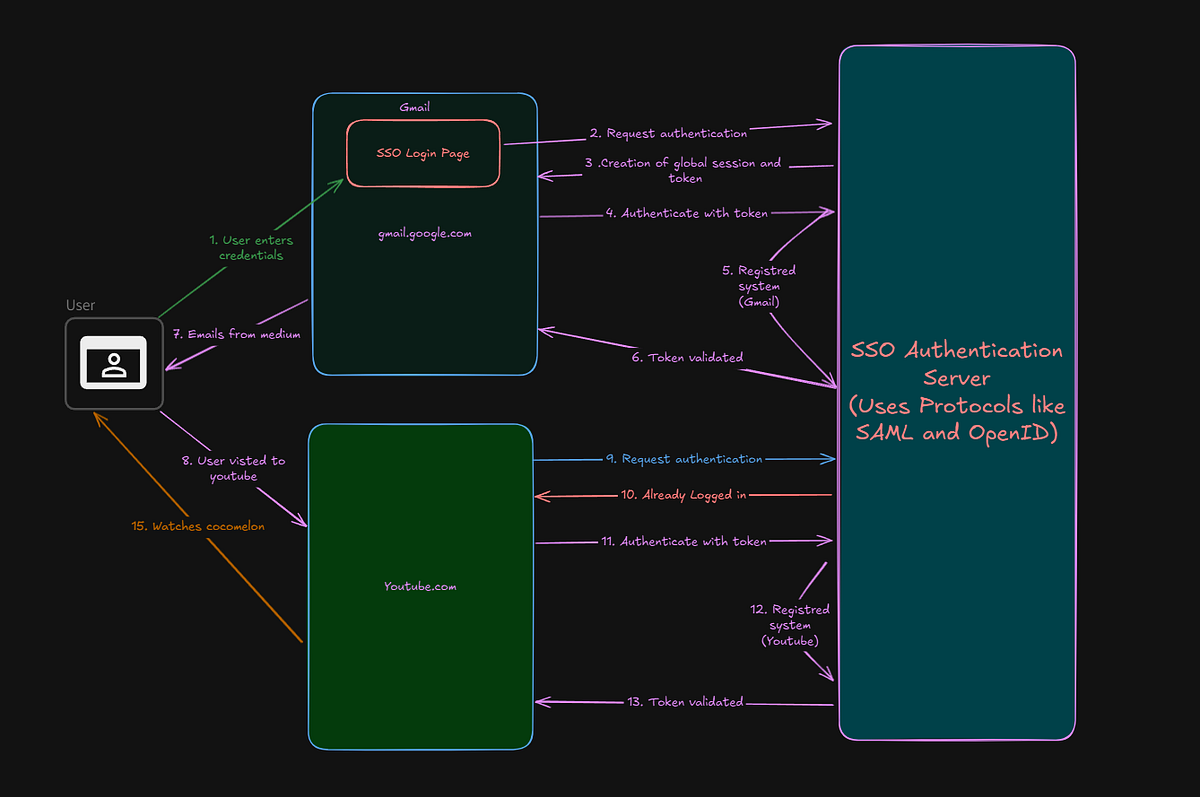
Below is the general flow of the SSO which I explain to you step by step, if you found an error please forgive me cause I was thinking about my x while writing this. The following diagram is referenced from Byte-Byte Go.
Steps Involved
- User Attempts to Access Gmail: First, the user goes to Gmail and wants to access some emails for this user wants to log in with credentials. So the user enters the credentials, SSO provides the frontend for the default SSO login.
- SSO Login Process: After that, Gmail(the Service Provider, SP) requests authentication to the SSO authentication server which uses protocols like SAML or OpenID Connect, which is explained further in the article.
- Global Session Creation and Token Issuance: The SSO will create a global session for the user and token(a unique identifier for authentication) which is valid for all of the domains in the particular organization.
- Token Sent to Gmail: The token is sent to Gmail from the SSO server, and GMail uses this to authenticate the user.
- Authentication of Gmail: Gmail validates the token and registers the user as an authenticated user.
- Access to Protected Resources: The token gets validated and ready to be provided to access the protected resources.
- Allowed to use the Protected email: The user can now access protected resources on GMail (e.g., emails).
- User Visits Another Domain (YouTube): Then the user visits YouTube, which is a different domain but of the same organization as Gmail(Google).
- YouTube Requests Authentication: YouTube requests authentication to the SSO server, SSO.
- SSO Responds to YouTube: SSO gives back a response in which SSO will tell YouTube that the user is already validated using the global session.
- Token Validation for YouTube: Youtube authenticates with the token got before from SSO.
- YouTube validates the token and registers the user as an authenticated user.
- The token gets validated.
- Access Granted to YouTube: You can now access Cocomelon
So behind every platform visit, there is this much overall computation that happens under the hood.
This concludes how SSO works, now let’s dive deep into the protocols SSO servers use to control the efficient flow of registering the user from the protected content. What SSO does and its significance
How Does SSO Authentication Server Work?
So particularly there are 2 best protocols are there which are used by SSO authentication servers, they are
- SAML(Security Assertion Markup Language)
- OpenID Connect
SAML(Security Assertion Markup Language)
This is an open standard used to exchange the authentications and authorization data with Service Providers.
Why the heck we are discussing this here?
Because this is the underlying technology used in SSO.
So let’s deep dive,
Key features of SAML:
- XML-based: SAML is an XML-based message formatting technique, used to ensure formatting, compatibility etc.
- Decoupled Authentications: This means that SP(Service Provider) relies on IDP (Identity Provider) for authentication, which decreases problems for the SP.
- Cross-Domain Compatibility: SAML works efficiently across different domains.
How SAML Works (Flow):
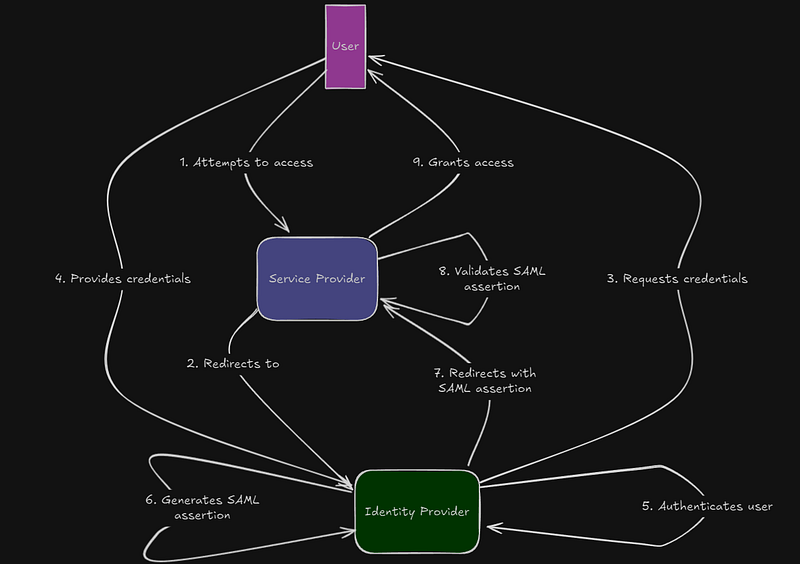
This is the flowchart of how SAML involvement happens, as well as how Service providers and Identity providers play important roles in the SSO authentication flow.
Steps Involved:
- Attempt To Access: The user tries to access the service from the Service Provider.
- Redirection: The service provider(Gmail) redirects the user to identity (Google, Oauth, OKT, A, etc.).
- Credential requests: The Identity Provider requests the required credentials for the authentication(Email, Password).
- Credential fulfillment: Users provide essential credentials to the identity providers for authentications.
- User Authentications: The user gets authorized.
- SAML assertions: Once an authenticated SAML assertion gets generated in which we have the user details, the response looks somewhat like this, for your response I have added comments in between.
<samlp:Response
    xmlns:samlp="urn:oasis:names:tc:SAML:2.0:protocol"
    ID="_someuniqueid12345"
    Version="2.0"
    IssueInstant="2024-06-10T12:34:56Z"
    Destination="https://serviceprovider.example.com/login"
    InResponseTo="id12345678">

    <!-- Issuer: Identity Provider issuing the SAML Response -->
    <saml:Issuer xmlns:saml="urn:oasis:names:tc:SAML:2.0:assertion">
        https://idp.example.com
    </saml:Issuer>

    <!-- Status: Indicates success or failure of the response -->
    <samlp:Status>
        <samlp:StatusCode Value="urn:oasis:names:tc:SAML:2.0:status:Success"/>
    </samlp:Status>

    <!-- Assertion: Contains the authentication and user identity details -->
    <saml:Assertion
        xmlns:saml="urn:oasis:names:tc:SAML:2.0:assertion"
        ID="_assertion12345"
        IssueInstant="2024-06-10T12:34:56Z"
        Version="2.0">

        <!-- Issuer of the Assertion -->
        <saml:Issuer>https://idp.example.com</saml:Issuer>

        <!-- Subject: Information about the authenticated user -->
        <saml:Subject>
            <saml:NameID Format="urn:oasis:names:tc:SAML:1.1:nameid-format:emailAddress">
                gautamelon@gmail.com
            </saml:NameID>
            <saml:SubjectConfirmation Method="urn:oasis:names:tc:SAML:2.0:cm:bearer">
                <saml:SubjectConfirmationData
                    NotOnOrAfter="2024-06-10T13:34:56Z"
                    Recipient="https://serviceprovider.example.com/login"
                    InResponseTo="id12345678"/>
            </saml:SubjectConfirmation>
        </saml:Subject>

        <!-- Conditions: Validity of the assertion -->
        <saml:Conditions NotBefore="2024-06-10T12:34:56Z" NotOnOrAfter="2024-06-10T13:34:56Z">
            <saml:AudienceRestriction>
                <saml:Audience>https://serviceprovider.example.com</saml:Audience>
            </saml:AudienceRestriction>
        </saml:Conditions>

        <!-- Authentication Statement: Information about the login event -->
        <saml:AuthnStatement AuthnInstant="2024-06-10T12:34:56Z" SessionIndex="_session12345">
            <saml:AuthnContext>
                <saml:AuthnContextClassRef>
                    urn:oasis:names:tc:SAML:2.0:ac:classes:PasswordProtectedTransport
                </saml:AuthnContextClassRef>
            </saml:AuthnContext>
        </saml:AuthnStatement>

        <!-- Attribute Statement: User attributes like email, name, roles, etc. -->
        <saml:AttributeStatement>
            <saml:Attribute Name="email" Format="urn:oasis:names:tc:SAML:2.0:attrname-format:unspecified">
                <saml:AttributeValue>user@example.com</saml:AttributeValue>
            </saml:Attribute>
            <saml:Attribute Name="role" Format="urn:oasis:names:tc:SAML:2.0:attrname-format:unspecified">
                <saml:AttributeValue>admin</saml:AttributeValue>
            </saml:Attribute>
        </saml:AttributeStatement>
    </saml:Assertion>
</samlp:Response>
7. Final Step(7–9): The Asserted SAML gets redirected to the Service provider, where it gets validated and grants the user the usage of the requested Service.
How Does OpenID Protocol Work?
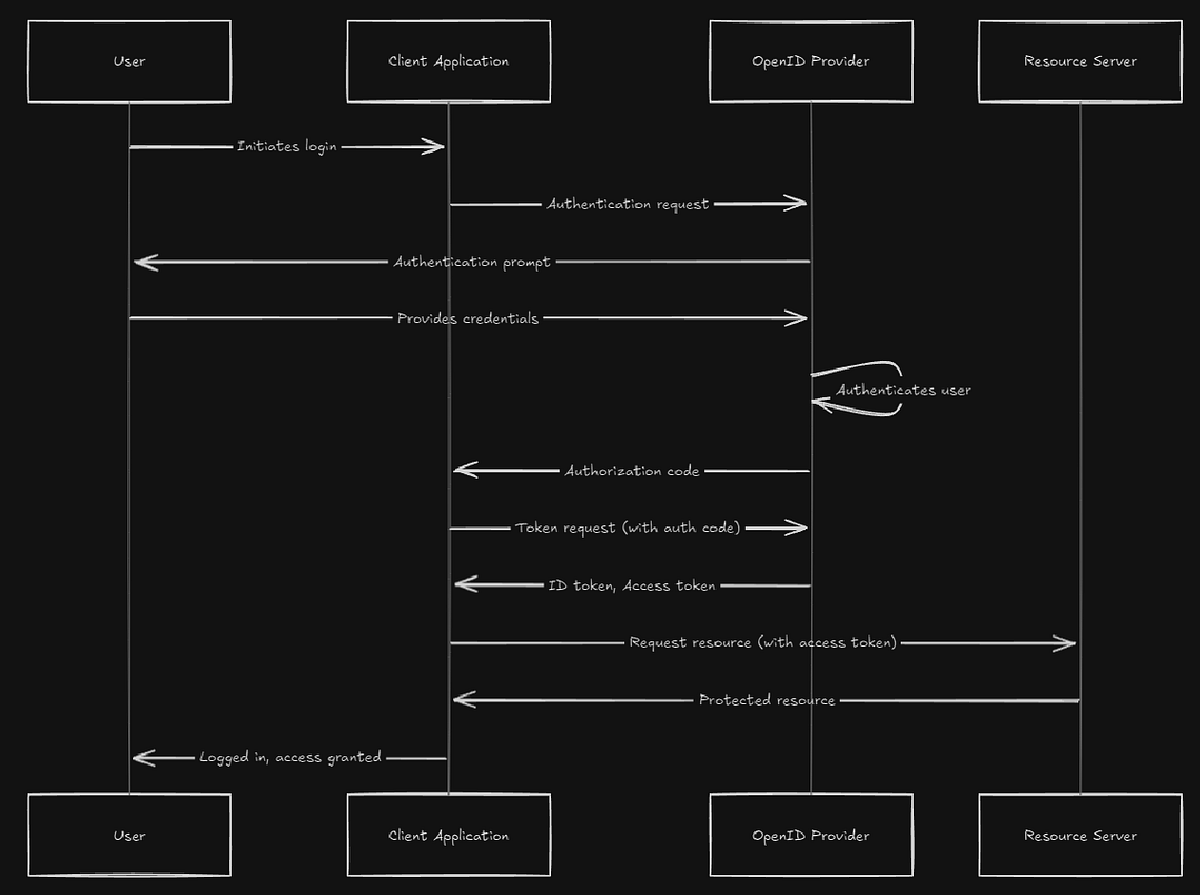
This is the basics of how OpenID works, you can read through it and able to understand it easily.
Conclusion
Giving final touches, there is one line:
“Enter once, Use everywhere”
SSO is a powerful mechanism that allows users to authenticate a user across multiple systems by enabling login once and gaining access to different applications based on the one you authenticated before. This reduces the risk of password disclosure and, the overhead of memorizing all the passwords.
SSO is a widely used strategy by everyone and going to be used in the future also, so studying about it is essential.