How DNS Works
The Internet’s Phonebook Complete Breakdown

As a Computer Science student, you once must have an intrinsic thought about why 142.250.64.78 always maps to google.com and why not any other websites like x.com.
In this interconnected world of the internet accessing information is as simple as typing a web address into a browser we get the necessary services and desired outputs easily at our fingertips but have you ever wondered what’s going on behind the scenes?
In this 10-minute read, I will explain every aspect of the DNS you need to know. If you don't have to read it right now then you can add it to your reading list. After this, you don’t need to go anywhere to search. This is the result of four hours of detailed research. So, let’s get started.
Information must be free: Non—member.
At last, I also have frequently asked Questions that will be going to test your understanding of this article thoroughly.
Table of Contents
· Introduction to DNS
· Why DNS is Essential
∘ 1. Memorability
∘ 2. Scalability
∘ 3. Flexibility
∘ 4. Load Balancing and Redundancy
· The Structure of DNS
∘ 1. Root Level
∘ 2. Top-Level Domain(TLD)
∘ 3. Second-Level Domain
∘ 4. Subdomain
· How DNS Resolution Works
∘ Step-by-Step DNS Query
· Components of DNS
· Types of DNS Records
· DNS Caching and Its Importance
∘ Benefits of DNS Caching
· DNS Security and Challenges
∘ Mitigation Strategies
· Advancements in DNS Technology
· Conclusion
· Frequently Asked Questions (FAQs)
∘ 1. What is the purpose of DNS?
∘ 2. How does DNS improve internet performance?
∘ 3. What is a recursive DNS resolver?
∘ 4. Can I use any DNS server for my internet connection?
∘ 5. How can I flush my DNS cache?
Introduction to DNS
The Domain Name System(DNS) is a foundational technology that efficiently translates human-friendly domain names into machine-readable IP addresses. It can be referred to as a phonebook for the Internet, enabling the users to access the website with an easy-to-remember address instead of the numerical IP address.
The DNS is a critical component of the internet that maps domain names to IP addresses, making our online experiences seamless. ~Vinton Cerf(fathers of the internet)
Without DNS, the Internet as we know it would be a vastly different, less user-friendly space.
Why DNS is Essential
1. Memorability
Humans are better at remembering names than numbers like me. DNS allows us to use memorable domains like www.google.com instead of the cumbersome IP address of 142.250.64.78.
2. Scalability
DNS provides a scalable system for naming devices over the web. As the internet grows, DNS accommodates new domains and addresses without overwhelming the overall systems.
3. Flexibility
Websites can have the ability to change the hosting providers or more formally IP address without affecting the domain name. DNS records can be updated to map to new IP addresses, making the transition process seamless for end-users.
4. Load Balancing and Redundancy
DNS can act as a reverse, forward proxy, and load Balancer using techniques like round-robin DNS, enhancing website performance and reliability.
The Structure of DNS
DNS is a hierarchical and decentralized naming system which means it can easily be scaled, ensures fault tolerance, Faster resolutions, etc., and is structured in a mirror of a tree-like organization.
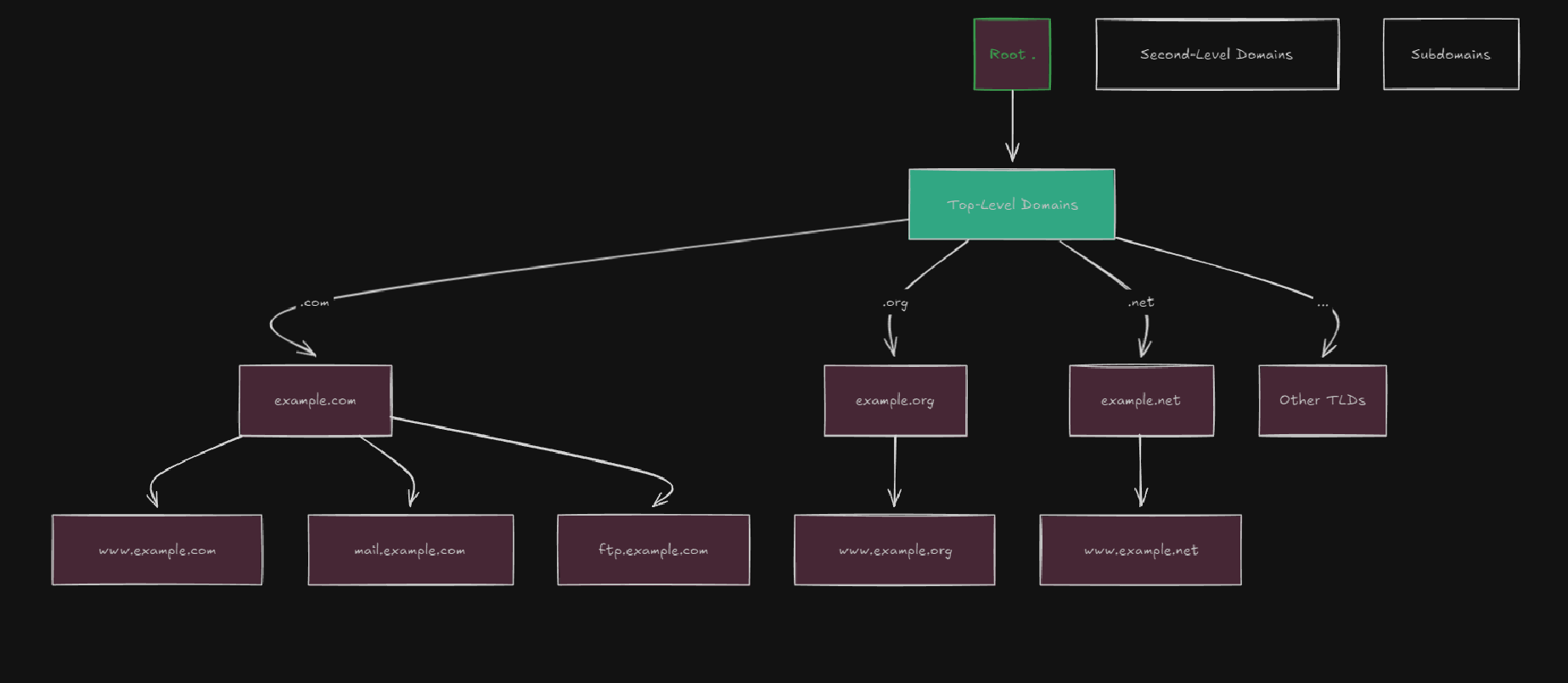
1. Root Level
The top of the DNS hierarchy is represented by a dot(.) which is maintained by 13 sets of root server clusters spread globally. These servers know how to find the Top-Level Domain(TLD) servers.
2. Top-Level Domain(TLD)
TLDs are the extensions at the end of each domain name such as .net, .com, .org, .edu, and various country codes like .in, .jp, etc. They are managed by respective organizations and registries like Godaddy.com.
3. Second-Level Domain
This is the human-readable part of the domain name directly to the left of the TLD, like the example in google.com.
4. Subdomain
Subdomains are the prefixes on the Second-level domain lookalike mail.google.com(Gmail) and www.google.com. They often represent the different services of a website.
How DNS Resolution Works
As we know DNS resolution involves converting a domain name into an IP address through several steps.
Step-by-Step DNS Query
Step 1: User enters the Domain Name
You type and enter www.google.com into your web browser’s address bar and press enter.
Step 2: Browser Checks Cache
The browser checks its cache to see if it has recently retrieved the DNS information for www.google.com and if it’s found, it uses the cached IP address to connect to the website and uses the services it wants
Step 3: Operating System Cache Lookup
If the browser cache doesn't have the information for the domain name, the query moves to be dependent on the operating system’s DNS cache.
Step 4: Query Sent to Recursive DNS Resolver
If the OS cache also lacks in the record, the query is then sent to a recursive DNS resolver, usually managed by your Internet Service Provider(ISP) or a third-party DNS provider like Google(8.8.8.8) or Cloudflare(1.1.1.1), if you want then you can also use them as DNS resolution.
Step 5: Recursive Resolver Checks Its Cache
The recursive resolver checks its cache for the DNS record, if records were then we are good to go. Otherwise, we go to the next step.
Step 6: Query to Root Name Server
If no caching is found, the recursive resolver queries one of the root servers for information about the given extension provided on the TLD server, in our case we have .com domains.
- Example: “I need the IP address for www.google.com”
Step 7: Root Server Responds
The root server responds with the address of the .com TLD name server.
Step 8: Query to TLD Name Server
The recursive resolver then queries the .com TLD name server for google.com, redirecting the query to the authoritative name server. Authoritative servers are the servers that store the actual DNS records like A, MX, CNAME, etc., for domains that are important for any website domains.
Step 11: Authoritative Server Responds
The authoritative server after being queried returns an IP address that maps to the domain given in our case www.google.com
Step 12: IP Address Returned to Client
The recursive resolver sends the IP address back to your computer which then be used for collecting the information out of the website and the usable services by loading the page.
Components of DNS
Various key points work together harmoniously to resolve the queries efficiently some of them are also as follows:
- Recursive DNS Resolver
A recursive resolver(also known as DNS precursor) is a server responsible for handling the incoming queries from client machines and performing all necessary lookups to return a final result to the client in the form of an IP address.
Mainly, it acts as the middleman between the client and the DNS hierarchy(root servers, TLD servers, and the authoritative servers).
The recursive is like for example, a client says to the DNS relover “Hey, I want the IP address for this domain. Please let me know the address of the next DNS server in the lookup process so I can look it up myself.”
But on the other hand, Iterative DNS Resolver, a client says to the DNS resolver “Hey, I need the IP address for this domain, please hunt it down and don’t get back to me until you have it.”
These approaches make resolving the DNS more intuitive and more efficient.
2. Root Name Servers
These are the servers that act as the first point of interaction in the DNS hierarchy. They help in directing the client to the required Top-level Domains(TLD) like .com, .org, and .net depending on the situation.
There are 13 logical root name servers labeled from A through M. These are not individual servers but instead they act as names or identifiers for groups of servers that operate as a unified entity.
Each logical server has many physical instances distributed worldwide. These all are distributed using the Anycast protocols.
Their main task is to direct the queries to appropriate TLD servers depending on the hostnames asked by the user.
3. TLD Name Servers
These are the servers and are at the second level in the DNS lookup hierarchy, sitting just below the root name server. These servers handle queries for specific-level Domains like .com, .org, and .net, or any other country domains like .in(India), or .uk(United Kingdom).
Their major task is to direct the queries to the appropriate authoritative servers.
4. Authoritative Name Servers
This is the final step of the DNS lookup for domains and they serve as the direct answers to queries.
Their main role is to store the DNS records such(As A, AAAA, MX, etc), and respond to queries by providing the exact record requested(e.g., the IP address for www.google.com)
They have different types-
- Primary(Master) server: They are used to store, update, and manage the DNS records.
- Secondary(Slave) server: They have a copy of the DNS records, so they can be used later if required in conditions of backups or faulty conditions.
Types of DNS Records
DNS records are instructions stored in authoritative DNS servers, containing the required information about a domain, such as its associated IP address.
- A Record(Address Record): Helps in mapping the domain to its corresponding IPv4 address, for example:
www.example.com -> 192.0.2.1 - AAAA Record (IPv6 Address Record): Responsible for mapping the domain name to an IPv6 address, eg
www.example.com -> 2001:db8::1 - CNAME Record (Canonical Name Record): This is helpful when we need to allow multiple domain names with the same IP, basically each domain name points to another domain name
blog.example.com -> www.example.com - MX Record (Mail Exchange Record): They are the mail servers that are only responsible for receiving emails for the domain.
example.com -> mail.example.com(priority:10). - TXT Record: They are allowed to insert arbitrary text into the DNS records.
example.com -> "v-spf1 iclude:_spf.google.com ~all" - NS Record(Name Server Record): This helps in specifying the authoritative name servers for the domain.
DNS Caching and Its Importance
DNS caching improves the efficiency and speed of DNS resolution by storing the responses to queries locally for a certain period defined by the Time To Live(TTL) value. There are various types of DNS caching some of them are as follows, I will explain those that are difficult to understand like
- Browser Cache
- Operating System Cache: The OS maintains its cache of DNS records. You can be able to view your os DNS by using the command.
ipconfig /displaydns.
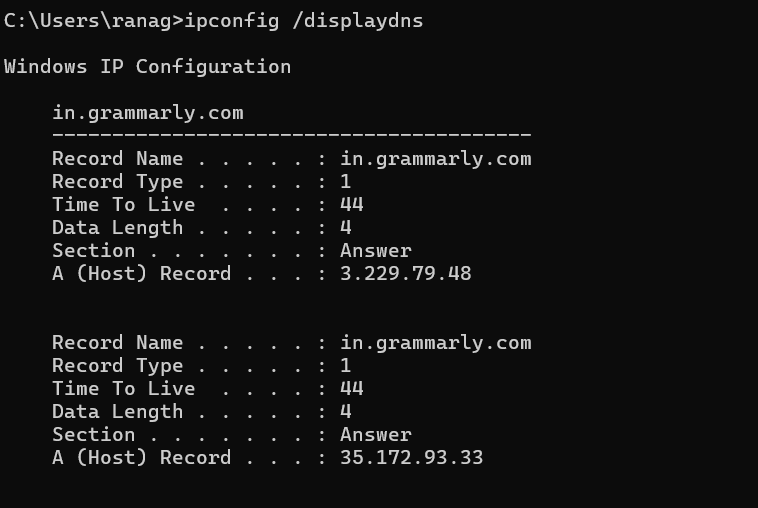
3. Recursive Resolver Cache: As these are mostly controlled by the ISPs they cache randomly used domain hostnames IPs for future use cases.
Benefits of DNS Caching
As everybody knows, optimized caching drastically reduces the overhead of performing any time-consuming tasks. Thus, DNS caching also helps systems by reducing latency, Decreasing server Load, and improving user experience.
DNS Security and Challenges
While we know that DNS is an integral part of the internet functionality, bad practices make the system vulnerable to various attacks, some of which are as follows:
- DNS Spoofing: An attacker intentionally corrupts the DNS data into the resolver’s cache and makes the user redirect to a malicious website.
- DNS Amplification Attacks: Flooding the DNS servers with traffic so that they become the target of DOS(Denial of Service).
- Man-in-the-Middle Attacks: They are responsible for intercepting the DNS queries by manipulating the response and redirecting them to malicious sites.
Mitigation Strategies
- DNSSEC(Domain Name System Security Extensions): They add a cryptographic signature to the existing DNS record, allowing the resolvers to verify the authenticity of the data. Using them one can make their DNS resolution secure so that there are no DNS spoofing things come up.
- Response Rate Limiting (RRL): This is like Captcha which helps to block the bot calls to the resolution of DNS which mitigates the issues of DNS amplification attacks to a greater extent.
As Cybersecurity expert Bruce Schneier says,
Security is a process, not a product.
Continuous monitoring and vigilance of the vulnerability make the evolution of threat analysis more proficient.
- Access Control Lists(ACLs): Helps by introducing privileged access only to a limit of the system, which results in reducing exposure to malicious requests.
Advancements in DNS Technology
As the usage and use cases of DNS peaked various technologies were also used to provide privacy and new protocols of usage, some of them are as follows:
- DNS over HTTPS(DOH): As we know website data are passed over internet using the protocols like HTTPS, so we transmit the DNS queries from the client to the recursive resolver over HTTPS(using TCP port 443) by encapsulating them within HTTPS requests. This encryption helps in preventing eavesdropping and man-in-the-middle attacks to a greater extent.
- DNS over TLS (DoT): DNS queries are encrypted and transmitted over a TLS connection, which provides an encryption layer, but without the overhead of HTTP/HTTPS protocols
Difference from DoH
- DoT uses a dedicated port which is TCP(port 853), while DoH uses standard HTTPS ports(TCP port 443)
3. Anycast DNS: This approach introduces multiple, geographically dispersed servers that share the same IP address. This will be beneficial which leads to increased redundancy and reduced latency which is the basic need of developers.
Conclusion
So, by wrapping up with these I just want to say that DNS is the bread and butter of the internet, quietly and efficiently translating human-readable domain hostnames to machine-understandable and making the DNS resolution smooth like cheese butter. It’s the backbone that supports the vast, complex web of connection we rely on everybody.
As Steve Crocker, an internet pioneer, expressed:
“The Domain Name System is a marvel of technical architecture, providing a decentralized, scalable, and reliable system that holds the internet together.”
Frequently Asked Questions (FAQs)
1. What is the purpose of DNS?
- DNS helps in translating human-readable DNS hostnames into machine-readable IP addresses, allowing users to access websites using easy-to-remember names instead of IP addresses.
2. How does DNS improve internet performance?
- DNS improves the internet performance by caching the frequently used IP address either locally or in DNS resolution servers provided by the ISPs, these helps in reducing the resolution process to a greater extent.
3. What is a recursive DNS resolver?
- A recursive DNS resolver is a server that is responsible for doing the DNS resolution through the different DNS servers on behalf of the client.
4. Can I use any DNS server for my internet connection?
- Yes, you can configure your network settings to use public DNS servers like Google DNS(8.8.8.8/8.8.4.4) or Cloudflare DNS(1.1.1.1/1.0.0.1), which may offer faster and more secure DNS resolutions.
- If I tell you about myself then earlier I was used to using the Google Public DNS which is
8.8.8.8to play the banned games in India. So yes this is possible we can do this for our preferences.
5. How can I flush my DNS cache?
- Windows: Use the command
ipconfig /flushdns. - macOS: Use the command
sudo killall -HUP mDNSResponder. - Linux: Use the Command
sudo systemd-resolve --flush-caches.