How Digital Signatures Protect Software from Tampering
Trust me I am a legitimate person
Have you ever noticed that some reputed software in the market of the era why not being manipulated or being compromised? Or why the resources downloaded from the trusted domains don’t have any virus inbuilt?
All these questions were being suffered on my brain until I did deep research on this specific domain of Digital signatures which are like the bread and butter of maintaining the software’s legitimacy and integrity which provide the end user a trust for the software being provided.
Digital Signatures
So we are now comfortable with why we should use digital signatures — But what the hack is digital signatures?
Ok if we go via Google and search it says
Digital signatures are cryptographic schemes for verifying the authenticity of digital messages or documents.
But if you want to know how they are being generated I wrote a story about it, go and check it out here — Understanding the SHA Algorithm: A Deep Dive.
Generally speaking, Think of digital signatures as a fingerprint for software, they are so delicate things which means if you change a single bit of data from them then it leads to a significant change in the final hash value which makes it easy to detect data tampering.
Why?
The big question here which is being rolled over my mind is why we need this thing to be in the software, because if we are downloading from the official website then we are pretty much aware that the software is legitimate and not being tampered with.
But this is the biggest mistake, let me explain to you that if somebody being an attacker sent you the spoofed version of the current same-looking website of the software, then you also think this is the legitimate user and download the software but this leads to many other issues because the software can contain various malware like Trojan horses, ransomware, etc.
This is the point where digital signature comes into play, because if the digital signatures created during the development of the software differ from the official one then we won’t install it.
Digital Signatures are essential for:
Data Integrity: This ensures that data is not been altered or corrupted during production or by any other suspicious means.
Verifying Authenticity: This helps in identifying that the software that is downloaded comes from a trusted source.
Preventing Malware Insertion: Protects against attackers injecting malicious code into legitimate software.
Compilance and Trust: Someone said this very good line, Trust is the most expensive thing in this world. So to build Trust you must need to use digital signatures.
MD5 vs. SHA-256: Why the Shift?
So now for the digital signatures we use various algorithms such as MD5, SHA-256, SHA-512, etc. But for this one, we should consider only SHA-256.
MD5 was once used very much for file integrity and trust communication, but it has several vulnerabilities and loopholes that are being exploited by today’s superfast computer and this has become unsuitable for security-sensitive applications.SHA-256, part of the SHA-2 family, provides much stronger security and is the preferred choice for modern software verification
Why MD5 Is Considered Weak:
- Susceptible to collision Attacks(where two different files produce the same hash).
- It can be cracked using modern computing power.
Practical Demonstration: Verifying a SHA-256 Checksum
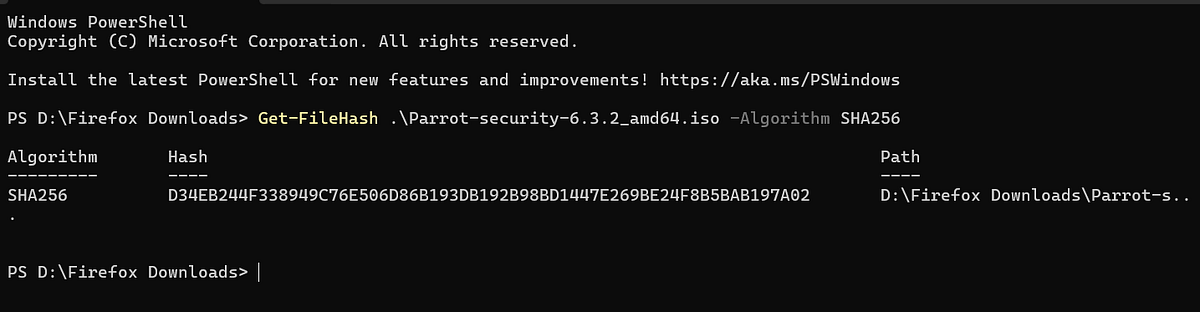
Developer many times provides the SHA-256 value of the current software on their websites as checksums. To verify the integrity of the downloaded file, follow these steps:
On Windows
- Open Powershell and run the following command
Get-FileHash software.tar.gz -Algorithm SHA2562. Check the current output of the SHA-256 with the one which is given on the website.

Real-World Examples of Digital Signatures in Action
- Linux Distributions: Major Linux distributions provide SHA-256 checksums and GPG signatures for official packages.
- Windows Executables: Microsoft enforces code signing for drivers and critical software updates.
- Cryptocurrency Wallets: Bitcoin wallets and exchanges provide signed binaries to prevent supply chain attacks.
Conclusion
Digital signatures, especially the SHA-256 ones are the breakthrough in the distribution of various software in the market. They enforce data integrity, build trust, and maintain the authenticity of the software applications.
As cybersecurity evolves various other techniques such as crystal lattices overcome the SHA-256 because of the quantum advancement which must maintain the ins and outs of the current digital signature compliance.
FAQs
Q. Can we break SHA-256 like MD5?
- As of now, SHA-256 can’t be able to break from the known attacks, but in the future, it may possible to break it using the quantum computer(The underlying technology used for quantum entanglement).