How Calls Work for AI Agents
The Architecture of Calls for AI Agents

A sneak peek at my plan before I was writing this story, writing this story felt as important as a workout — skipping it would leave me restless.
Enough of this, but what is the motive of this article? This article is going to introduce modularity in my series of intelligent AI agent creation, as this architecture has too many moving parts, so we need to make sure we capture the most important ones only and explain them efficiently.
Moving Parts
For a fluid understanding of the article, we need to understand some of the key points:
- PSTN(Public Switched Telephone Network): PSTN is the “traditional” telephone system that has been around for over a century. It’s the network of copper wires, fiber cables, and switches that connects landline phones worldwide.
- VoIP (Voice over Internet Protocol): A modern and cost-effective way of making calls over the internet. It reduces costs compared to PSTN, but reliability depends on the quality of the network connection.
- SIP (Session Initiation Protocol): This is a protocol used to initiate real-time communication between two or more participants in a session or room within our WebRTC architecture. By using this, we can enable the outbound and inbound calls.
- SIP participant: This is another participant, like an AI agent or a user. It's special because it makes a SIP endpoint that allows users to connect to the LiveKit room using it.
- Inbound Calls: These are the calls for which users or customers reach out to the agent; we incur less cost compared to the outbound one
- Outbound Calls: These are calls made by the agent to the user for specific tasks. They generally cost more compared to inbound calls.
- Trunking → originally a telecom term meaning a shared communication line that carries multiple calls at once.
How does this work?
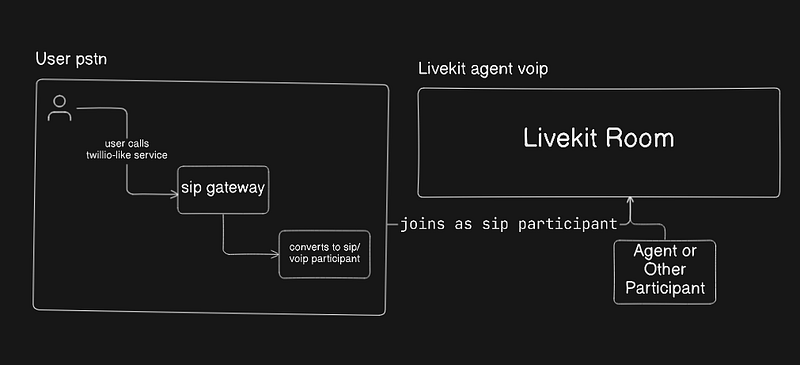
The above diagram shows only for outbound calls, but the inbound calls also remain the same. There is a slight difference in the architecture, which is as follows:
- For Inbound Calls: The user initiates the call, and the agent gets dispatched automatically
- For Outbound Calls, the Agent initiates the call, and the user is dispatched as the participant.
There are several steps that make the architecture work currently; we will focus on the inbound calls. The outbound architecture remains the same:
Call Initiation
After the user initiates the call, it may be either a PSTN or a VoIP call.
If it is a PSTN, then it gets converted to a SIP participant by the SIP Gateway so that it can be joined as a participant of the room, or else if it's voip call, it remains the same.
The call now has a SIP participant representation that can join a LiveKit room.
SIP Participant Joins LiveKit
This step is most crucial; it allows the AI agent to treat the caller like any other participant in a WebRTC session, meaning the AI can receive and send audio streams in real time.
Agent Dispatch To Room
By default, agents get dispatched to the room no matter what, but you can change the dispatch rules and all so that they can be modified for more fine-grained rules.
Make this a checkpoint; users connected via VoIP or PSTN can share their audio tracks.
These audio streams are passed into the pipeline, where the first stage is ASR (Automatic Speech Recognition).
ASR combines STT (Speech-to-Text) with VAD (Voice Activity Detection), which I explained in an earlier set of articles.
Pipeline Flow Logic
Now that we have the STT texts so we can feed them to the pipeline, which further comes as LLM, and Optional TTS.
This flows continuously until someone of the participants remains in the LiveKit Room except the Agent.
Session/Call Termination
After the conversation is complete, LiveKit automatically ends the session once the last user leaves the room.
The SIP participant also finally gets removed from the room, which efficiently completes our flow other calling agent works.
Conclusion
In conclusion, AI Calling Agents rely on a combination of technologies — PSTN, VoIP, SIP, and LiveKit — to make calls possible. Using them efficiently makes the Agent Smart, effective, and usable.
In future articles, we will explore inbound and outbound calls in detail, including their use cases and the benefits they provide.