Getting Started With Peer-to-Peer Connection
Connection between Peers

As a backend developer, yesterday I was thinking about how peer-to-peer connections work. I also implemented a basic Peer to Peer Chatting app that can send messages from one peer to peer by minimizing the central server dependency for data transfer. In this article, I will mention my 7 hours of deep study about what I studied and implemented, as I also don't know what Peer-to-Peer data transmission is.
A chain is only as strong as its weakest link.
Don’t worry — you will learn faster than me, as I will explain each aspect easily with examples.
What is Peer-To-Peer Connection?
So, the first question might arise what the heck is Peer-to-Peer Connection?
A peer-to-peer connection is a system of decentralized computers that simultaneously acts as both the sender and provider of the resources. Peers contribute to the network by sharing resources such as:
- Storage space
- Bandwidth
- Processing capabilities
In short, there is no control of a single central computer, each peer is equally capable of providing content to other peers and managing the network traffic efficiently.
There are many real-life examples where peer-to-peer connection is used like:
- BitTorrent- This is a gem that everybody used once for getting premium files free of cost.
- Limewire: A P2P file-sharing application that allows users to search and download files from other users.
So for our chatting app we are going to create a “Web Chatting App” There are various techniques and technologies to achieve but the most advanced forms are WebRTC and peer.js.
How Do Peer-to-Peer Connections Work?
It works on the principle of a direct connection between two or more peers or devices(nodes) by excluding the middleman or technically no centralized server to facilitate the exchange process. Let’s discuss the general flow of the working part:
1. Peer Nodes
- In a P2P network, each of the devices in a particular room acts both as a client and a server, this is individually called peers.
- These peers can do both tasks individually of sending and receiving in full duplex(bidirectional at the same time., eg: video calling).
2. Discovery
For peers to be connected, they must discover but this part is done by a third server which is also called a Signaling Server.
- Centralized Signaling Servers to exchange the information connection details such as remote and local descriptions, SDP(Session Description Protocols). These can be created by Websockets.io(The underlying technology in every real-time behavioral software.)
- Distributed Systems like distributed hash tables(DHT) are used to map peer locations.
3. Establishing Connections
Peers establish connections using protocols like:
- TCP/UDP: TCP(Transmission Control Protocols) and UDP(Universal Datagram Protocols) are the protocols that are basic protocols that are used for transmitting efficiently at an optimal pace. But in WebRTC, signaling information is not directly done using protocols like HTTP or Websockets. The signaling process helps exchange connection details, including the codec(Coder Decoder) format, and ICE(Interactivity Connectivity Details) candidates. These ICE candidates are further used for establishing the peer-to-peer connection by facilitating NAT traversals.
- NAT Traversal: These are techniques in which STUN(Session Traversal Utilities for NAT) and TURN(Traversal Using Relays around NAT) help peers bypass the firewall connections.
4. Communication
Once Peers get connected, data flow starts directly between them as usual without the involvement of any intermediaries. For efficiency maintenance data is sent over chunks or in streams.
Example Workflow Using WebRTC
A. Signaling Phase:
- Peer A sends its details(e.g., public IP, port also known as SDP) to a signaling server.
- Peer B retrieves this information to initiate the connection
B. NAT Traversal:
- Both peers negotiate paths by bypassing the firewalls or NAT using STUN/TURN servers.
C. Data Exchange:
- Once the connection is established, data is transmitted directly between peers.
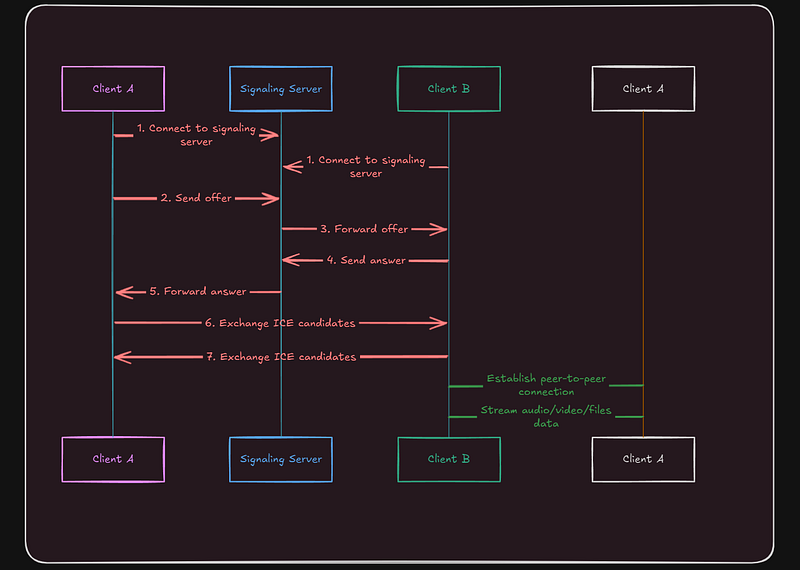
Think of a P2P network as a group of friends calling each other directly rather than going to a telephone booth.
My Project: Building a Basic Peer-to-Peer Chat App
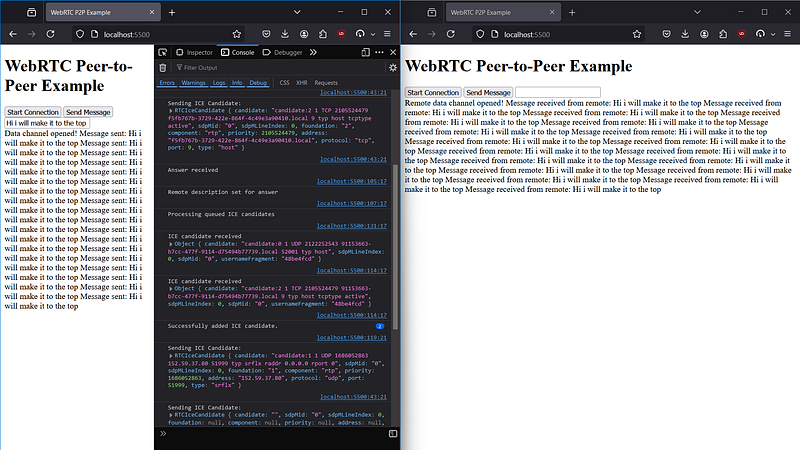
Above is my implementation of a Peer-to-Peer Chat App in which the server isn’t involved it is just involved in the discovery process, when a tap on start connection the connection between both different window localhosts starts and they share their ICE candidates and starts the peer-to-peer communication.
Steps Involved:
Step 1: Server.js File
This server file is a standalone signaling server, which is used during discovery and ICE candidate sharing including the SDPs, you can see that every event socket will emit a specific event according to its requirements.
Step 2: Initialize Variables and Socket Connection
Establish the necessary socket.io connections, and initialize the necessary variables
const socket = io("http://localhost:3000");
let localConnection, remoteConnection, dataChannel;
let candidateQueue = [];
I have used “localhost” as io but you can use your own, this candidate queue is used strategically, so that if any of the connections can’t be able to make, then it gets queued to the queue, and can be popped out later when congestion is low
local connection and remote connection, they are responsible for storing the references to the RTCPeerConnection objects for both the local and remote peers respectively.
Step 3: Setting ICE Servers Configuration
The configuration object defines the ICE servers that will be used as STUN/TURN servers during the connection process.
const configuration = {
  iceServers: [
    {
      urls: "stun:stun.l.google.com:19302",
    },
  ],
};
STUN server: A public STUN server(stun:stun.l.google.com) is used as a NAT traversal strategy, allowing different peers behind routers/firewalls to discover their public IP addresses.
Step 4: Ice Candidate, Event Triggering, and Data Channel Creation
localConnection = new RTCPeerConnection(configuration);
 localConnection.onicecandidate = (e) => {
  if (e.candidate) {
    socket.emit("ice-candidate", e.candidate);
  } else {
    console.log("End of ICE candidates.");
  }
 };

 dataChannel = localConnection.createDataChannel("chat");
 dataChannel.onopen = () => {
  console.log("Data Channel Opened");
 };

 const offer = await localConnection.createOffer();
 await localConnection.setLocalDescription(offer);
In the following snippet, we can see that we initialize the local connection with a RtcPeerConnection, which when created an ice candidate event.d
- The onicecandidate event sends the ICE candidates to the signaling server as soon as they are discovered by others.
- A data channel named“chat” is created to send the messages.
- An offer is created and set as a local description, and emitted through the signaling server to the remote peer.
Step 5: Handling Incoming Offer
When the remote peer sends the offer, the local peer receives and processes it, creating a corresponding answer to continue the handshake for further peer-to-peer connection creations.
socket.on("offer", async (offer) => {
  remoteConnection = new RTCPeerConnection(configuration);

  remoteConnection.onicecandidate = (e) => {
    if (e.candidate) {
      socket.emit("ice-candidate", e.candidate);
    }
  };

  remoteConnection.ondatachannel = (e) => {
    const eventChannel = e.channel;
    eventChannel.onmessage = (e) => {
      console.log(`Message received from remote: ${e.data}`)
    };
    eventChannel.onopen = () => {
      console.log(`Remote data channel opened!`)
    };
  };

  await remoteConnection.setRemoteDescription(offer);
  await processIceCandidates(remoteConnection);

  const answer = await remoteConnection.createAnswer();
  await remoteConnection.setLocalDescription(answer);
  socket.emit("answer", answer);
});- On receiving an offer from the local peer a remoteConnection created.
- The on-data channelevent listens for any incoming data channel.
- The offer is set as the remote description, and the current remote description is set as “answer” and sent back to the local peer.
Step 6: Handling Incoming Answer
The incoming answer from the remote peer can be listened to on the following code.
socket.on("answer", async (answer) => {
  await localConnection.setRemoteDescription(answer);
  await processIceCandidates(localConnection);
});
Step 7: Queuing or Adding the ICE candidate
If the remote connection is not ready then the ICE candidates are queued, until the remote description is set.
socket.on("ice-candidate", async (candidate) => {
  const connection = localConnection || remoteConnection;

  if (connection && connection.remoteDescription) {
    await connection.addIceCandidate(candidate);
  } else {
    candidateQueue.push(candidate);
  }
});
This code strategically adds the ice candidate if everything is ok else it will push to the candidate queue, which I mentioned before.
Step 8: Sending and Receiving Messages
Finally, once the data channel gets opened up, peers can exchange messages.
if (dataChannel && dataChannel.readyState === "open") {
    dataChannel.send(message);
}
If the data channel is opened and in the ready state then only the data channel will share the message with the peer.
Challenges in P2P Communication
Peer-to-peer (P2P) communication enables direct interaction between devices, bypassing intermediaries like servers, but instead of this, there are various challenges, some of which are as follows:
- High Knowledge Gap: I think this may be not for everyone but personally, when I started studying this concept of WebRTC, I had various problems in understanding SDP, ICE, etc.
- Bandwidth and Latency: In P2P communication, the bandwidth is dependent on each peer’s network connection, if any peer has a slower internet connection or unreliable networks may experience delays, and in various cases, data integrity comes up with data corruption and packet losses.
- Scalability: While P2P networks are decentralized, they still require effective management of connections as the number of participants increases.
Conclusion
P2P solves the major reliance of the data transfer on the central server, by excluding and implementing only peer-to-peer connection, many chatting services use this technique such as Technitium Mesh, Tox, Jami, and Orbit but P2P may also have various tradeoffs as discussed above one of which is Security where P2P lacks and that's big messaging tech relies on End-To-End Encryption in which there is a requirement of a central server. So using it makes the data transfer drastically faster but lacks Encryption, but various methods can be used to make it secure also.